Your words. Your voices.
Turn anything you write into a podcast, audiobook, broadcast, ad or video that talks. Pick a voice for every character, add your own Custom or Designed voice on a paid plan, and share it. Easy enough for anyone to make.
Write it like a document. Hear it in real voices. Change any part of it later without starting over. Free to use, no credit card required.
Edit it like a document
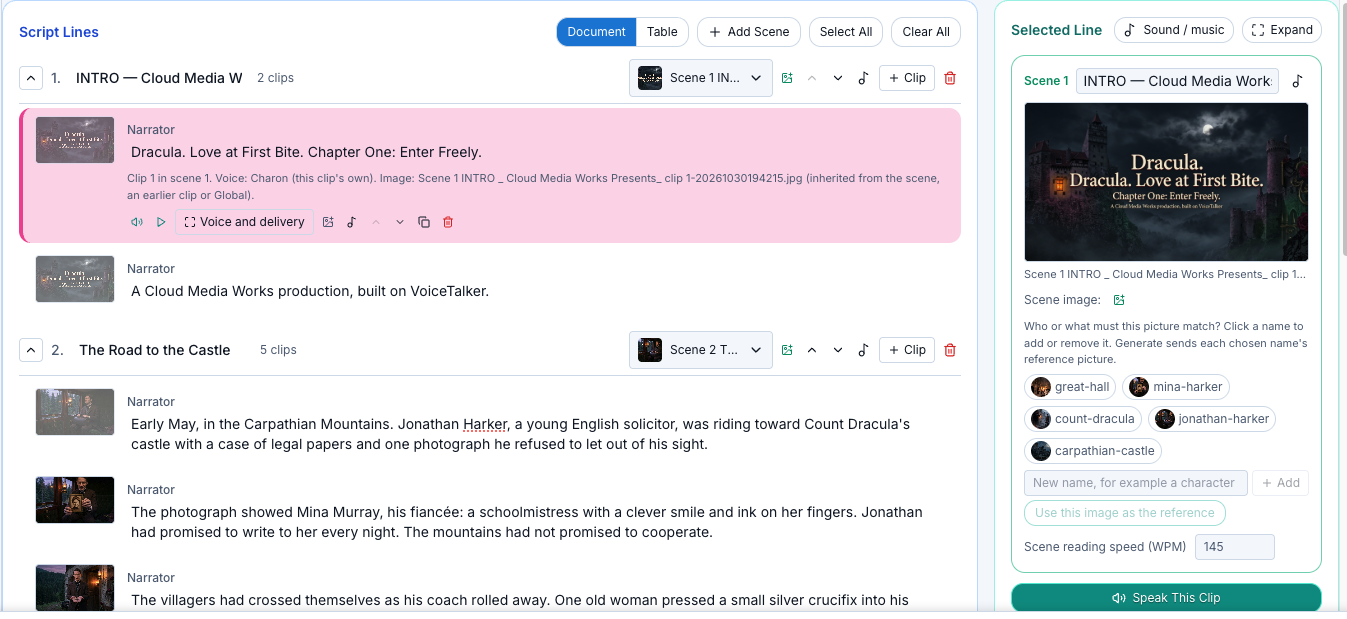
Each line is a paragraph with its speaker above it. Click a speaker to change the voice, open a scene to add sound or a picture. If you have edited by transcript before, it will feel familiar.
Fix one line, keep the rest
Replace a clip in a finished MP3, or a section of a finished video. Everything after it moves to fit, and your original files stay as they were.
Always know what is current
A line you changed after its voice was made is flagged. Keep the old audio, or make new audio for that line only. A generation that fails is never charged.
Bring your own AI tools
Free Open Agent Skills, for most AI agents, turn a Word, PDF or PowerPoint file into a voiced script with pictures. See how, and download them. No sign-up needed.
Coming from another editor? Writing, speakers, scenes and recording work the way you expect.
Open Agent Skills: from a document to a finished script
Free skills that work with most AI agents. Give your AI assistant a file and it hands back a script with voices, pictures and checks, ready to open in VoiceTalker.
Characters
Voices, delivery and looks
Script
Scenes, clips, intro and outro
Pictures
The picture plan and prompts
Finish
Prompts placed on every clip
- Start from a Word file, a PDF, a PowerPoint, plain notes or Markdown.
- Splits it into scenes and short one-speaker clips, with an intro and an outro added.
- Gives every speaker a different voice, kept the same through the whole script.
- Saves a cast you can reuse, so the next episode keeps the same voices and looks.
- Plans the pictures: you choose how many, and each character looks the same in every shot.
- Keeps whoever is speaking on screen.
- Checks its own work at every step and tells you where it saved each file.
- Works with most AI agents that support Agent Skills.
Pictures that match every line of your story
Describe a scene and VoiceTalker paints it. Name your characters once and they look the same in every picture. Then record the whole story, voices, pictures and captions, in one take.
Every picture, one run
One button makes the pictures for your whole script, in story order, and puts each on the right scene.
Characters that stay the same
Name a character or place and the first picture becomes its reference. Every later picture is made to match.
The right picture, right on cue
Each picture stays up until the next one arrives, in step with the voice and the words.
Record it. Share it.
Your video, captions and script are saved together, timed to match from the first second to the last.
One Script. Every Voice. Perfectly Timed.
Custom voice cloning, two AI engines, real-time translation, and scroll-synced on-screen scripting — all in one tab.
Custom voice cloning
Design a voice from a text prompt, or clone your own from a short recording, and narrate every script in a voice that's actually yours. Custom or Designed voices are on the paid plans.
Two AI engines, one script
Mix OpenAI's built-in voices with a Google Gemini Custom or Designed voice clip by clip — pick whichever engine fits each line.
Free plan now narrates too
Every Free account gets scripts up to 5,000 characters, all voices except Custom or Designed voices, 15 minutes of voice, script saving, Victor your assistant, and sound effects and music — no credit card required.
Narrated scrolling
Scroll speed follows the actual narration audio, not a guess.
40+ languages
Both the spoken audio and the on-screen text translate together
Your account, secured
Sign-in and billing handled by Supabase and Stripe.
 OpenAI

40+ built-in premium voices
Premium voices in 40+ languages with ready-to-use OpenAI and Google text-to-speech voices for narration and translation — no setup required. You can also use your OWN voice and mix with AI voices.

Design or clone with Google
Custom voices run on Google's Gemini text-to-speech engine, mixed right alongside OpenAI's built-in voices.
COMBINE a mix of Your Voice, Custom or Designed voices, or OpenAI and Google voices
VoiceTalker Studio is a unique orchestration platform that allows you to design and create mixed voice experiences..
Gemini and OpenAI voices may not support every language, are provided "as is" by their respective providers, and pricing, availability, features, and specifications are subject to change. Gemini custom voices may expire one year after creation — see the Gemini 3.8 Flash-Lite TTS specs and the OpenAI GPT-4o Mini TTS specs.

Meet Victor, VoiceTalker assistant
At the bottom of every view, ask him how to make anything in VoiceTalker. Victor is now included in every plan, Free too.
Now it paints, too
Describe every scene and make all the pictures in one run. Image generation is on the paid plans.
Add sound and music
Put sound effects and music on any scene or clip. You hear them in your runs and in your recordings. Included in every plan.